Where AI meets real Business Strategy & Implementation
The only newsletter of its kind for SMBs
AI Implementation Strategy Team
Ary Aranguiz, CPTD, AIPM | Benjamin Mills, CPA, CFO

Welcome to the Third Edition of
The AI Ready Business Biweekly Newsletter!
If you’re here, it means one thing:
You’re not waiting for the future of business.
You’re preparing for it.
This newsletter is built for small and mid-sized business (SMB) leaders and their teams who want to use AI in ways that actually make sense, financially, operationally, and strategically.
No hype.
No tech overload.
Just smart, practical moves you can apply right away.
Whether you're a beginner with AI, or an advanced user looking to optimize your existing AI strategies, this newsletter is for you!
And one important reminder before we dive in:
👉 Don’t go at this alone.
Your biggest wins will come from learning with others and applying AI hands-on.
That’s why you’ll also want to click the links below to join our AI Ready Business Community and sign up for our AI courses.
Join Our Virtual & In-Person Courses
How This Newsletter Works
Every issue is designed to respect your time and move your business forward.
In each edition you'll find short, clear, actionable insights each month:
Monthly Tool
One AI tool. Reviewed through a business and financial lens.

Quick Win
One simple way to use AI that creates immediate business value right away.

CFO Insight
AI + financial insights from a CPA & CFO with 25+ years of experience, focused on ROI & risk.

Deep Dive
One focused topic each month, with playbooks, guidance, and ready-to-use prompts.

Let’s dive in to the third edition!
Monthly Tool
Claude.ai & Claude Cowork

What it is:
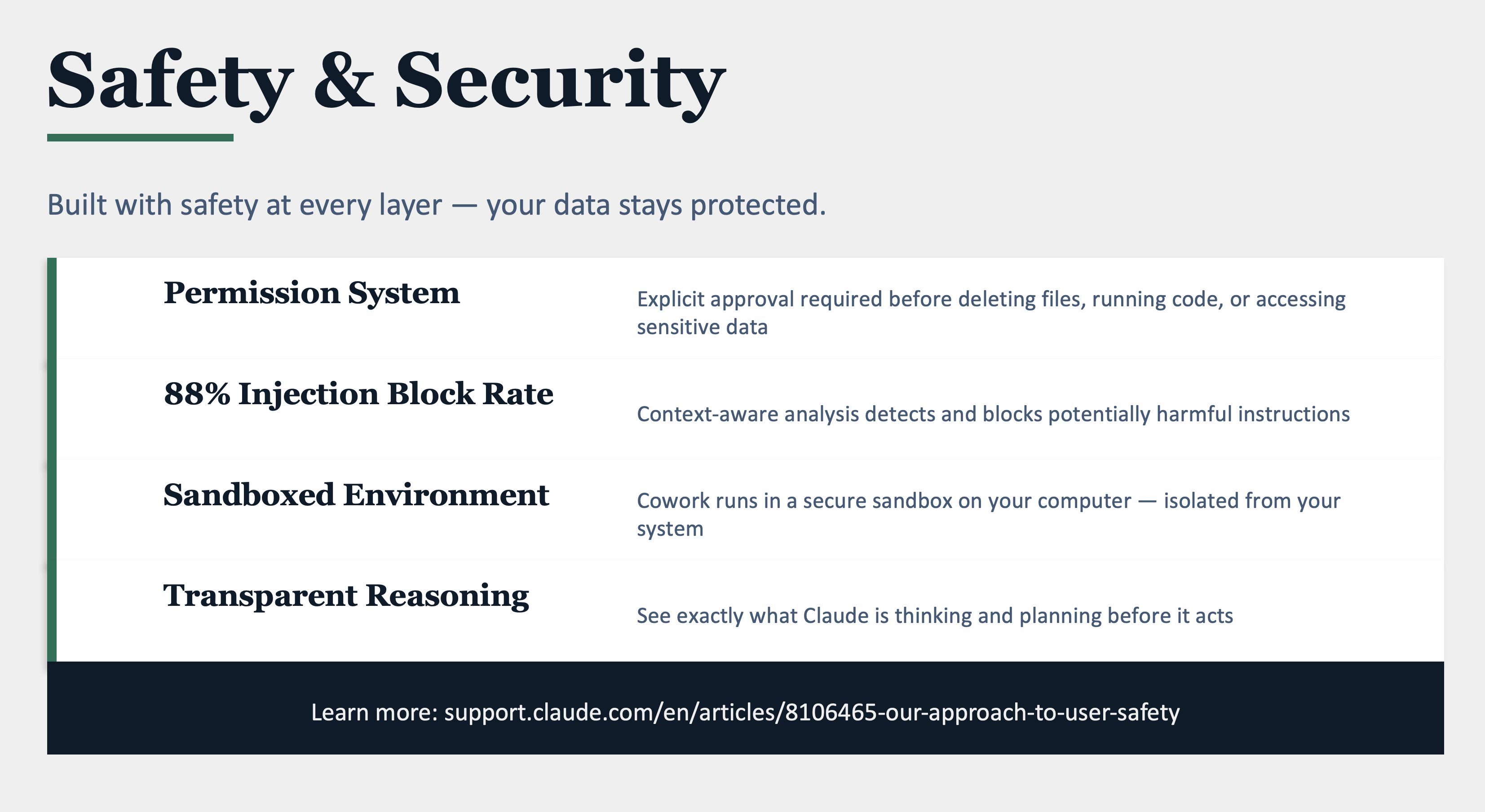
Claude is Anthropic’s AI assistant, think of it as a thoughtful business partner that lives on your computer. Claude.ai is the chat interface (like ChatGPT), and Claude Cowork is the newer desktop version that can actually do things on your computer, open files, create spreadsheets, build presentations, draft emails, and work through multi-step projects without you babysitting every click.
Why it matters for your business:
Most AI tools answer questions. Claude Cowork completes tasks. That’s a big difference when you’re running a business and your to-do list is longer than your day.
What makes it different:
• It works with your files. Connect a folder on your computer and Claude can read, organize, and create documents right where you need them. No copy-pasting back and forth.
• It handles multi-step work. Ask it to “research competitors and build a comparison spreadsheet” and it actually does the research, builds the spreadsheet, and saves it to your folder. Start to finish.
• It connects to your tools. Gmail, Google Calendar, Google Drive, HubSpot, Canva. Claude plugs into the platforms you already use through connectors.
• It runs on your phone too. Pro and Max subscribers can message Claude from their phone, and it works on your desktop in the background, results waiting when you get back to your computer.
• Computer Use. When there’s no direct integration, Claude can literally point, click, and navigate your screen to get things done. It asks permission every time.
Who it’s best for:
Business owners, consultants, and small teams who spend too much time on operational work and not enough on growth.
Pricing: Claude.ai is free for basic use. Pro plan ($20/month) unlocks Cowork and computer use. Max plan ($100/month) adds heavier usage limits for power users.
Bottom line: If ChatGPT taught you how to talk to AI, Claude Cowork teaches you how to work with AI.
Tutorials: https://claude.com/resources/tutorials/cowork-onboarding-guide
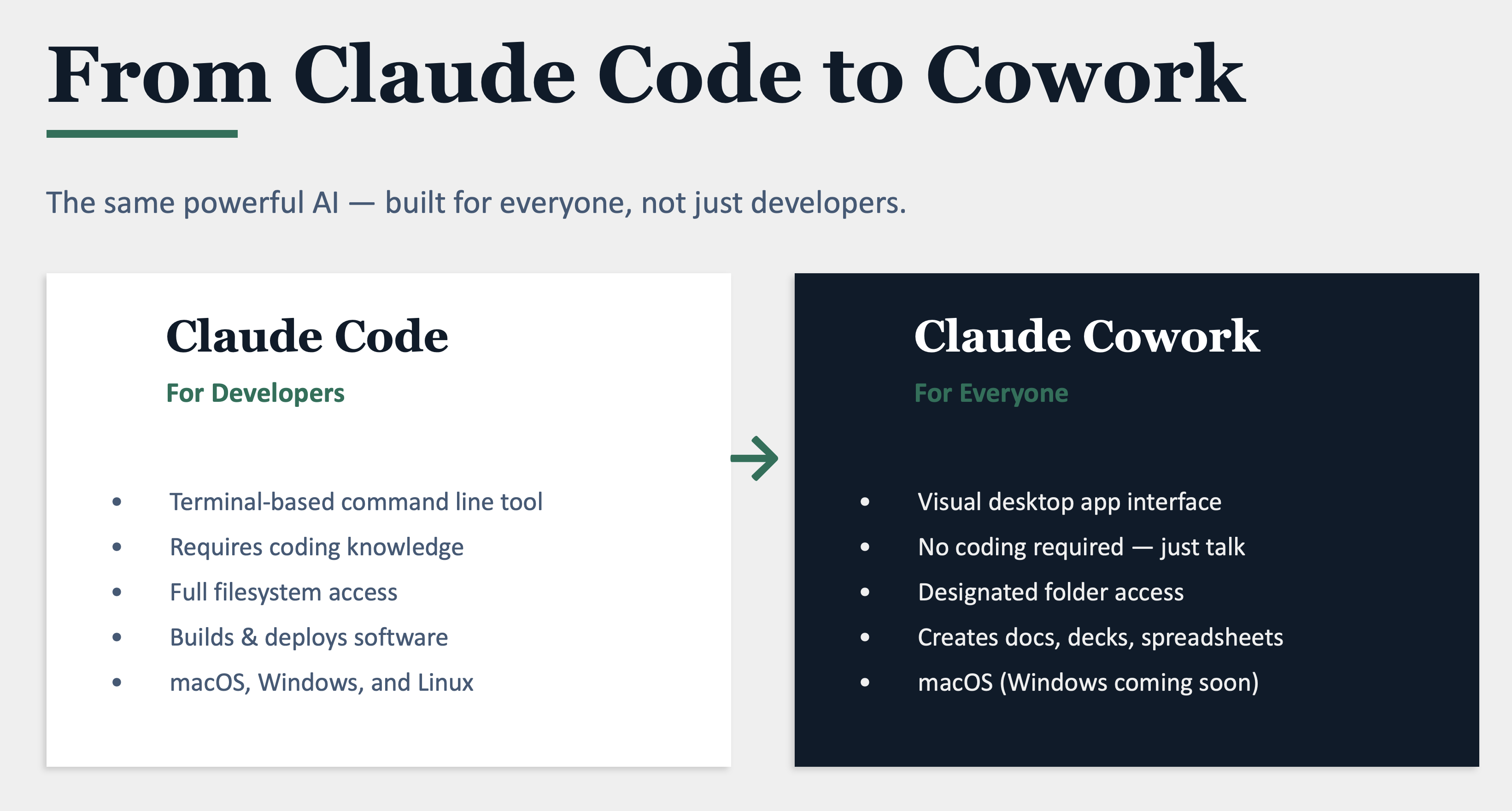
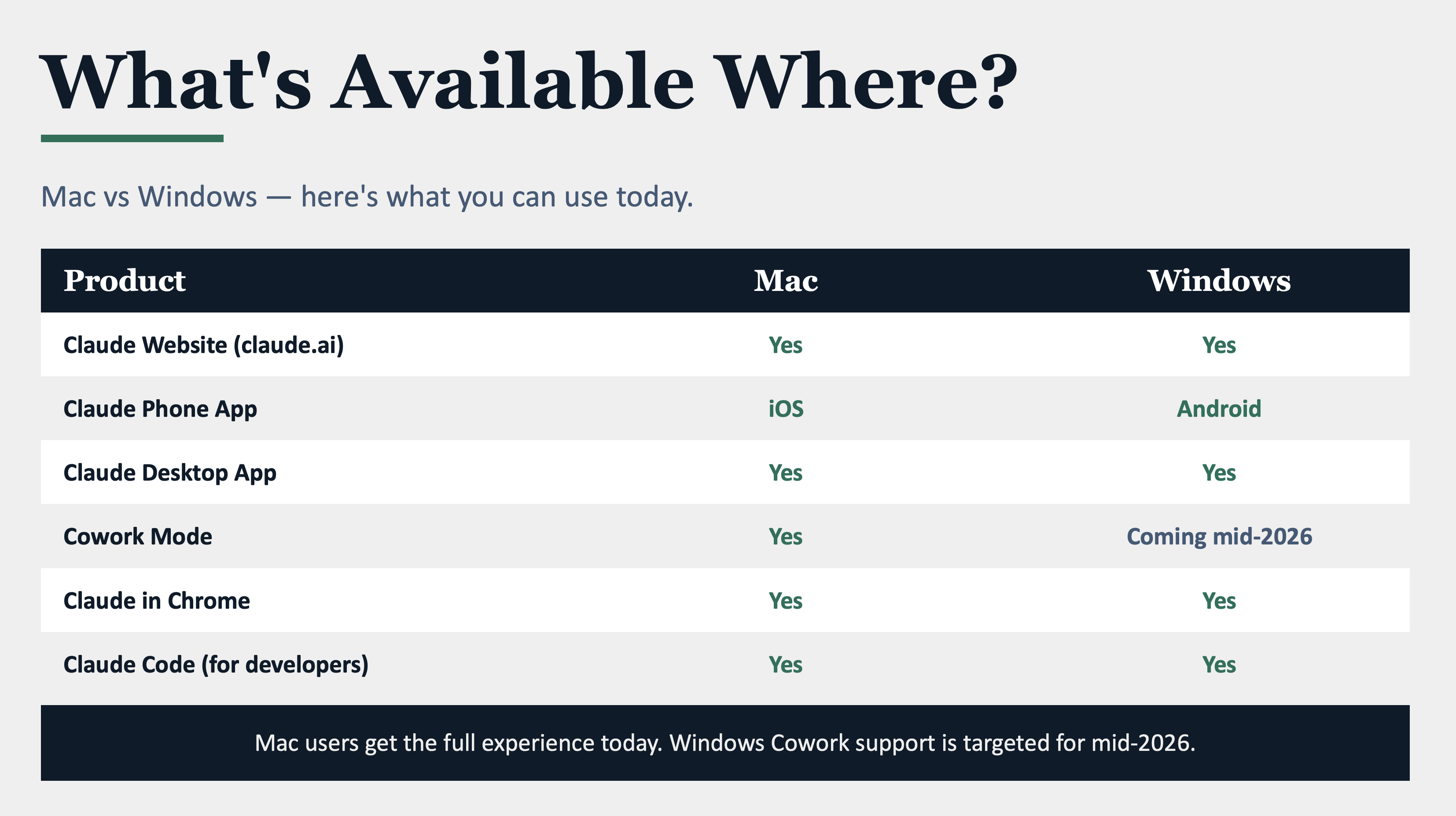
Claude has multiple products. Below is a list of Claude Products and where they are available.
Quick Win:

Turn a Competitor’s Website into Your Battle Plan in 2Minutes
Here’s something you can try right now with Claude that would normally take you an hour of research, or never get done at all.
The Problem:
You know you should be keeping tabs on your competitors, but who has time to dig through their websites, read their messaging, and figure out how you stack up? It falls to the bottom of the list every single week.
The fix:
1. Open Claude.ai (free) or Claude Cowork (Pro)
2. Use this prompt:
“Go to [competitor’s website URL]. Analyze their homepage, services page, and pricing (if visible).
Tell me:
- What are they promising customers?
- What language and tone do they use?
- What do they emphasize that I don’t?
- Then give me 3 specific things I can say or change on my own website to better differentiate my business.
My business does [brief description of what you do].”
What you’ll get back:
• A clear breakdown of your competitor’s positioning and messaging
• Specific gaps or opportunities where you can stand out
• Ready-to-use language you can put on your own website today
Pro tip: If you’re using Claude Cowork, Claude can actually visit the website and read it for you using Computer Use. You can also upload a screenshot of a competitor’s ad or social post and ask: “What’s working about this? How can I do it better?”
Time saved: 45–60 minutes of manual research, compressed into a 2-minute conversation. Do this once a month for your top 3 competitors and you’ll always know where you stand.
Deep Dive:
The Claude Playbook: 3 Advanced Workflows Most Business Owners Don’t Know Exist
Last month we gave you the why: why AI implementation fails and the 3 things that make it stick.
This month, we’re going deeper with Claude-specific workflows that go beyond the basics. These aren’t “summarize this document” prompts. These are multi-step, high-leverage workflows that replace the kind of work you’d normally pay a consultant, analyst, or attorney hundreds of dollars an hour to do.
Each workflow includes the exact prompts, a step-by-step walkthrough, and real-world examples from legal professionals and small business owners.
Workflow #1:
The Contract Intelligence Comparison

Who it’s for:
Any business owner, attorney, or office manager who signs recurring contracts, vendor agreements, lease renewals, SaaS subscriptions, service provider contracts, insurance policies.
The Problem Nobody Talks About:
Most businesses sign contracts in isolation. You get a new agreement, you read it (or skim it), and you sign. But here’s what’s costing you money: you’re not comparing it to your previous agreements.
Vendors quietly add clauses. Pricing structures shift. Termination terms get tighter. Liability provisions creep in your direction. And because no one tracks the evolution, you don’t catch it until it’s a problem.
Comparing contracts side-by-side is tedious, detail-intensive work. A paralegal might spend 3–4 hours doing it. Most small businesses simply don’t do it at all.
The Claude Fix: Upload both contracts and run the comparison:
“I’m uploading two contracts:
Document 1: [My previous/existing agreement]
Document 2: [The new/proposed agreement].
Compare these and give me:
SECTION 1 — What’s New: Every clause in Doc 2 that didn’t exist in Doc 1. Quote exact language, explain in plain English, rate as Favorable / Neutral / Unfavorable.
SECTION 2 — What Changed: Every modified clause. Show old vs. new language side by side, explain practical impact, flag who benefits.
SECTION 3 — What Was Removed: Anything in Doc 1 missing from Doc 2. Flag removed protections.
SECTION 4 — Red Flags & Leverage Points: Top 5 changes to push back on with alternative language. Shifts in liability or financial exposure. Anything that could create problems 12–24 months out.
SECTION 5 — Negotiation Cheat Sheet: 3–5 prioritized asks with exact language to propose. My business is a [describe].
I am the [tenant / client / buyer]. Write as if you’re briefing me before a negotiation meeting tomorrow.”
Real example: Legal professional: A small firm attorney uploaded a client’s 2024 commercial lease and the landlord’s proposed 2026 renewal. Claude identified 7 new clauses, including a “building improvement surcharge” buried in Section 8.4 that would have added $2,800/year, hidden inside a paragraph about common area maintenance.
Claude also caught the landlord had shortened the cure period for late rent from 15 days to 5 days and removed a right of first refusal on adjacent space. The attorney used Claude’s counter-language to negotiate the surcharge out entirely and restore the 15-day cure period.
Real example: Small business owner: A marketing agency owner uploaded her current and proposed contracts from her email platform. Claude caught that the new terms added a “usage-based overage” clause that didn’t exist before, meaning her monthly cost could spike 40% during peak campaign months. She used Claude’s negotiation language to lock in a flat-rate cap before signing.
Cowork Pro Tip: Say “Save this comparison as a Word document and highlight every red flag in bold.” Claude creates a polished, shareable report you can hand to your attorney or bring to the negotiation.
Time saved: 3–4 hours of manual comparison work per contract renewal.
Workflow #2:
The Industry Standards Deal Analyzer

Who it’s for:
Business owners evaluating any significant purchase, contract, or partnership, SaaS subscriptions, professional services, equipment leases, insurance policies, franchise agreements, commercial leases.
The Problem Nobody Solves For You:
When a vendor hands you a contract, you’re at an information disadvantage. You know what they’re offering. But you don’t know what’s normal.
Is a 3-year minimum commitment standard?
Is a 15% annual price escalator typical?
Without industry benchmarks, you’re negotiating blind.
And vendors know it.
The Claude Fix: Upload the contract and request the benchmark analysis:
“I’m uploading a [type of agreement]. Analyze against industry standards for this type of product/service:
SECTION 1 — Pricing & Payment: How does pricing compare to norms? Hidden costs above market? What should I negotiate? SECTION 2 — Contract Length & Termination: Is duration typical? Auto-renewal standard or aggressive? Typical notice period? SECTION 3 — Liability & Risk: How does liability cap compare? Is indemnification balanced? Who bears the insurance burden? SECTION 4 — Service Levels: Are SLA commitments in line with competitors? Meaningful remedies or empty promises?
SECTION 5 — The Verdict: Rate this deal 1–10. Am I overpaying or taking on too much risk? Top 3 things to negotiate.
My business: [describe, size, industry]. My leverage: [describe].”
Optional Power Move — follow up with:
“Based on your analysis, draft a professional email to the vendor requesting modifications to the 3 most important issues. Reference specific sections, explain why terms are below market standard, and propose alternative language. Tone: firm but collaborative.”
Real example: Legal professional: An estate planning attorney was renewing practice management software. The vendor proposed a 3-year commitment with 12% annual escalator and no termination for convenience. Claude showed industry standard is 1–2 years, 3–5% escalators, and 90-day termination. The attorney negotiated a 2-year term with 4% escalator and 90-day out, saving roughly $8,400 over the contract.
Real example: Small business owner: A restaurant owner evaluating a POS system. Claude revealed the equipment lease included a “technology refresh fee” at 3x industry average, and the data portability clause would make switching providers nearly impossible without losing 2 years of transaction history. The owner negotiated the fee down and added a data export provision, changes agreed to in one meeting.
Cowork Pro Tip: Evaluating multiple vendors? Upload all proposals and ask: “Compare these 3 proposals against each other AND against industry standards. Tell me which deal is best and why.”
Time saved: 4–6 hours of research most business owners never do, which means they leave money on the table every time they sign.
Workflow #3:
The Business Blind Spot Audit

Who it’s for:
Business owners, managing partners, and operators who suspect they’re losing money, time, or clients in ways they can’t easily see.
The Problem That Keeps You Up At Night:
Every business has blind spots, inefficiencies, risks, and missed opportunities invisible from the inside because you’re too close to the day-to-day.
Big companies hire consultants at $300/hour to find these.
Small businesses just live with them until something breaks.
The challenge isn’t that the information doesn’t exist. Your financials tell one story. Your contracts tell another. Your client feedback tells a third. But nobody’s reading all three at the same time.
Step 1 — Upload your business documents. The more you give Claude, the better this works. Even 3–4 will produce powerful insights: your P&L (last 12 months), top client/vendor contracts, pricing sheet, subscription list with costs, client feedback or reviews, org chart, top expenses by category.
Step 2 — Run the Blind Spot Audit:
“I’m uploading [list documents]. Treat these as a complete picture of my business. Conduct a Blind Spot Audit:
SECTION 1 — Revenue Leaks: Where am I leaving money on the table? Underpriced services, clients on legacy rates, scope creep, missing revenue streams.
SECTION 2 — Cost Blind Spots: Overlapping subscriptions, overpaying vs. market, expenses growing faster than revenue, costs not tied to delivery.
SECTION 3 — Client Risk Exposure: Concentration risk, unfavorable contract terms, clients likely to leave, service delivery gaps.
SECTION 4 — Operational Friction: Manual processes to automate, bottlenecks, capacity issues, slow decision-making.
SECTION 5 — 90-Day Action Plan: Top 5 actions ranked by impact. For each: what to do, cost (time and money), expected payoff. My business: [type, employees, revenue, years]. Be direct — I’d rather hear uncomfortable truths now than discover them during a crisis.”
Real example: Legal professional: A 4-attorney firm uploaded their P&L, top 5 engagement letters, and 22 software subscriptions.
Claude found:
(1) Two clients on 2021 rates — roughly $34,000/year in underpriced work. (2) Three overlapping document management tools — $6,200/year in savings.
(3) Their largest client was 38% of revenue with a 14-day termination clause — massive concentration risk with almost no protection.
The firm renegotiated the engagement letter within a month.
Real example: Small business owner: A home services company uploaded 8 months of financials, vendor contracts, and Google reviews. Claude identified materials costs up 23% but pricing only adjusted 8%, roughly $47,000 in lost annual profit. Claude also spotted 4 of the last 12 negative reviews mentioning the same scheduling issue. The owner raised prices, fixed the communication gap, and recovered the margin within one quarter.
Cowork Pro Tip: Connect Google Drive and say: “Pull my latest P&L from Drive, read the contracts in my Vendors folder, and run a Blind Spot Audit.” Claude gathers documents and runs the analysis without you uploading anything manually.
Impact: This isn’t about hours saved. It’s about money found. Businesses typically uncover $10,000–$50,000+ in annual revenue leaks, cost savings, or risk exposure they didn’t know existed.
Your Action Plan: Getting Started This Week
|
Workflow |
Best first use |
What to upload |
Expected impact |
|
#1: Contract Comparison |
Next contract renewal |
Current + proposed contract |
Catch hidden changes before signing |
|
#2: Deal Analyzer |
Most expensive vendor |
Vendor’s contract or proposal |
Know if you’re overpaying |
|
#3: Blind Spot Audit |
Quarterly review |
P&L + contracts + subscriptions |
Find $10K–$50K+ in opportunities |
Start here: If you’re signing or renewing anything in the next 30 days, start with Workflow #1 or #2. For the biggest overall impact, block off 30 minutes to gather documents and run Workflow #3.
🔒 Data Privacy & Security Disclaimer:
Only upload documents you are authorized to share. Avoid including sensitive personal data (e.g., SSNs, bank account numbers) or highly confidential information unless you are using a secure, approved environment. When working with tools like Claude, follow your organization’s data governance policies, use redacted or sample data when possible, and ensure compliance with any legal, regulatory, or client confidentiality requirements.
⚠️ Important: Claude is a powerful analysis tool, not a licensed professional. Always verify critical findings with qualified legal, financial, or business advisors before making major decisions.
CFO Insights:
The Real Cost of Claude, and Where the ROI Shows Up
Let’s talk numbers. If you’re evaluating whether Claude (or any AI tool) is worth the spend, here’s how to think about it like a CFO, not a tech enthusiast.
The investment:
• Claude Free: $0 (limited usage, no Cowork)
• Claude Pro: $20/month ($240/year)
• Claude Max: $100/month ($1,200/year)
Where the return shows up:
|
Task |
Manual Time |
With Claude |
Weekly Savings |
|
Meeting follow-ups |
20 min each |
2 min each |
1.5 hrs (5 meetings) |
|
Email drafting |
15 min each |
3 min each |
2 hrs (10 emails) |
|
Research & summaries |
45 min each |
10 min each |
1.75 hrs (3 tasks) |
|
Document creation |
60 min each |
15 min each |
1.5 hrs (2 docs) |
Conservative weekly savings: ~7 hours
At a blended rate of $50/hour, that’s $350/week in recovered productivity — or roughly $18,000/year — from a $240 investment.
Even at half those estimates, you’re looking at a 37x return on the Pro plan.
The real ROI most people miss:
It’s not just the hours saved — it’s what you do with them. Those 7 hours a week could be client calls, strategic planning, or business development. The cost of not using AI isn’t just inefficiency. It’s the growth opportunities you’re leaving on the table.
Cash flow note:
Unlike hiring (onboarding, training, benefits), AI tools deliver value on day one with zero ramp-up. You can cancel anytime with no severance.
For a small business watching cash flow, that’s a meaningful difference.
The AI-Assisted Sales Process That’s Converting at 45%

The numbers are in, and they’re hard to ignore!
AI-powered sales flows are delivering 25–40% conversion rate improvements across industries, with top performers hitting 45%+ reply rates using multi-signal personalization.
Sales teams using AI report 27% higher close rates, and predictive lead scoring alone increases conversions by 30% while identifying high-intent buyers 2x faster.
How it works without losing the human touch:
The winning formula isn’t replacing your sales conversations with bots. It’s using AI to do the prep work, researching prospects, scoring leads, personalizing outreach, and drafting follow-ups, so when you get on the phone, you’re armed with context and talking to people who are actually ready to buy.
Try it with Claude: Upload your last 10 sales call notes and ask:
“Analyze these conversations. What patterns do you see in deals that closed vs. ones that didn’t? What questions, objections, or signals appeared most often? Give me a refined qualifying checklist I can use before every call.”
Three industries seeing the biggest lift:
- Professional services (better proposal targeting),
- e-commerce (AI-personalized outreach sequences), and
- B2B SaaS (predictive lead scoring cutting wasted demos by half).
Why Your AI Tools Are Costing You More Than You Think
The average company wastes 25–32% of its total SaaS spend on unused or underutilized tools. That was already a problem before AI. Now it’s worse.
Teams are signing up for AI writing tools, code assistants, image generators, and data platforms at the team level, often without anyone tracking whether they’re actually being used.
The AI-specific trap:
Unlike traditional software with predictable per-seat pricing, many AI tools use consumption-based models. Your monthly bill can spike 40–60% without warning. And because AI tools are so easy to sign up for, companies are discovering they have 3–4 overlapping tools doing the same thing.
The quick audit with Claude: Pull up your last 3 months of credit card statements and paste the subscription charges into Claude: “Group these by function. Flag overlaps. Estimate which I could cut or consolidate, and how much I’d save annually.”
Most SMBs uncover $2,000–$8,000/year in waste. One Claude Pro subscription ($20/month) can often replace 3–4 standalone AI tools.
The SMB Prompt Library:
10 Copy-Paste Prompts for Any Business

Designed for Claude, ChatGPT, or any AI tool. Replace bracketed sections with your details.
𝟭 Contracts & Client Agreements
"Review this [contract / proposal / service agreement] and flag any scope gaps that could lead to disputes or misunderstandings. Suggest tighter language around [deliverables / timeline / payment terms / cancellation policy]."
2 Client & Sales Meetings
"I'm preparing for a meeting with a [prospect / existing client]. Here's what I know: [notes]. Give me 5 discovery questions that uncover their real pain points — not just the surface problem — so I can position my solution effectively."
3 Case Study & Social Proof
"Draft a case study from these project notes: [paste]. Format it as: Challenge → Approach → Results. Include a pull quote I can use on my website or in proposals."
4 Marketing & Offers
"Here are my current [service descriptions / product listings / offer pages]: [paste]. Rewrite them to be conversion-focused. Lead with benefits over features. Create natural urgency without being pushy."
5 Customer Reviews & Reputation
"Here are my last [X] customer reviews: [paste]. Tell me: the top 3 things customers love, my #1 complaint, and draft a professional response template I can use for negative reviews."
6 Client Communications
"Write a professional [follow-up email / onboarding message / payment reminder / policy update notice] for my clients. Tone: warm, clear, and trustworthy. Keep it under 150 words and avoid jargon."
7 Simplifying Complex Information
"Explain [this policy / process / service change / pricing update] in plain language that any customer can understand. Include a simple 3–5 question FAQ at the end."
8 Operations & Checklists
"Create a [weekly / monthly / quarterly] checklist for [task or process — e.g., client onboarding, closing procedures, equipment inspection]. Include: key steps, responsible party, and warning signs that something is off."
9 Team Training & Briefings
"I need a 5-minute team briefing on [topic — e.g., a new process, a safety concern, a policy change]. Format it as a script. Cover: what's changing, why it matters, and the 3 most important things my team needs to know."
10 Big Announcements
"I'm about to [raise prices / launch a new service / change a policy / make a major business update]. Write the announcement for 3 audiences: existing clients (reassuring and value-focused), prospects (compelling and benefit-driven), and my team (motivating and clear). Under 200 words each."
Pro tip: For best results, always paste real context into the brackets; the more specific you are, the more actionable the AI output will be. These prompts work in Claude, ChatGPT, Gemini, and Perplexity.
Building Your AI Team:
When to Hire, Automate, Outsource
The biggest question in 2026 isn’t whether to use AI; it’s how to staff around it.
According to Business.com’s 2026 SMB AI Outlook, 64% of small businesses are launching AI training programs, but only 12% plan to reduce staff. The smart play isn’t replacing people; it’s reorganizing who does what.
- Automate when the task is repetitive, rule-based, and doesn’t require judgment.
- Examples: data entry, invoice processing, report generation.
- This is where Claude Cowork’s Scheduled Tasks shine; set it up once and let it run.
- Hire when the task requires relationship-building, complex judgment, or creative strategy. But hire AI-fluent people; one person who knows how to leverage Claude is worth three who don’t.
- Outsource when you need specialized AI expertise you can’t justify full-time. Custom workflow building, tech stack integration, team training. Outsourcing costs $25–60/hour vs. $120K+/year for a full-time AI specialist.
The sweet spot: Keep your core team lean. Train them to use Claude for the repetitive 40% of their job. Outsource the technical setup. Result: a 5-person team that operates like a 10-person team — without 10 people on payroll.
AI in the NEWS
Financial: Google TurboQuant Rattles Hardware Stocks
Google's TurboQuant algorithm (released March 25) compresses LLM memory requirements by up to 6x with zero accuracy loss. Markets reacted fast — Micron dropped ~7%, SK Hynix ~6%, and SandDisk over 11%. For SMBs, the takeaway is simple: AI tools are getting cheaper and faster.
https://www.cnbc.com/2026/03/26/google-ai-turboquant-memory-chip-stocks-samsung-micron.html
🤖 Claude Mythos, Accidentally Leaked
On March 26, security researchers Roy Paz (LayerX Security) and Alexandre Pauwels (University of Cambridge) discovered that Anthropic had left nearly 3,000 unpublished internal documents sitting in a publicly searchable data store — exposed by a simple CMS misconfiguration. The leaked files revealed Claude Mythos, a new model tier above Opus that Anthropic describes as a "step change" in capability. But the real headline: Anthropic's own draft warned that Mythos is "currently far ahead of any other AI model in cyber capabilities" and "presages an upcoming wave of models that can exploit vulnerabilities in ways that far outpace the efforts of defenders".
https://fortune.com/2026/03/26/anthropic-says-testing-mythos-powerful-new-ai-model-after-data-leak-reveals-its-existence-step-change-in-capabilities/
🌍 Social Impact: AI & the Rural Health Gap
Also during the week of March 30, RFK Jr. and Dr. Oz unveiled a plan to deploy AI-powered robots and virtual care tools in rural America to address the shortage of healthcare providers in underserved communities. Virtual crisis care platforms are already helping rural residents access mental health resources in emergencies — a rare example of AI directly expanding access for the most vulnerable.
https://www.washingtonpost.com/health/2026/03/23/rural-health-ai-medical-tech/
Coming in the Next Issue
• Tool of the Month: We’re dive deeper into Claude Cowork, Plugins, Claude Skills and Connectors.
• Quick Win: A Claude trick that saves one business owner 3 hours every Monday morning. (Hint: it involves your inbox.)
• CFO Insights: “The AI Headcount Question” - When does it make sense to hire an AI tool instead of a person?
• Deep Dive: How to build your first AI workflow, a step-by-step guide for connecting your tools and automating a real process, even if you’ve never written a line of code.
Follow Us
YouTube: The AI Ready Business: Subscribe for implementation walkthroughs and case studies
LinkedIn: The AI Ready Business: We're sharing quick wins and real results weekly
Email: [email protected]: Questions, feedback, topics you want us to cover
Disclaimer
This newsletter is for informational purposes only. The contents do not constitute financial advice, investment advice, or professional guidance. AI tools and methodologies are evolving rapidly. Always test implementations with your team before deploying to critical business processes. Results vary based on your industry, resources, and execution. The views expressed here are based on real-world implementation experience, but your mileage may vary.
The AI Ready Business Newsletter
Edition 2 | April 1, 2026
Where AI meets real Business Strategy & Implementation
Responses